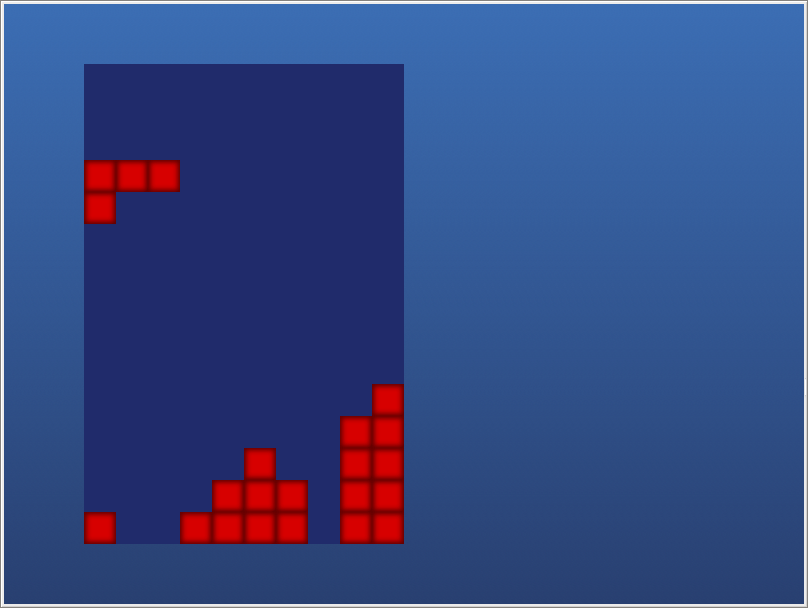
Falling blocks game in Plymouth

So, you have sat down at your computer and you’re waiting for it to boot, then suddenly you realise that it is doing a full fsck which is going to take a few minutes. What to do. You have two options:

  1. Sit quietly watching the little bar move slowly across
  2. Plymouth falling blocks game!

This is not a serious proposal, I just wanted to exercise the scripting system to see if I could find any bugs, but if you want to have a play with it, the script is available.

    • Ray
    • April 3rd, 2010

    Very Neat. Kind of reminds me of the old caldera installer

  1. Indeed, a neat demonstration of Plymouth power, which however I hope to never got to use ;p

    And just as Ray, I remember installing once Caldera many years ago and playing the game during the wait.

    Now how about some 3D shooter plymouth plugin? (like the canvas demo for Firefox)

  2. Ha ha, yet more proof of the power F/OSS brings. There’s only one problem with this script: Linux normally boots way too fast. On a recent machine you’d play for, what, 20-30 seconds at most?

    • kar
    • April 29th, 2010

    Which licence? GPL?

    • Sure if you like. For these scripts, I didn’t even put a licence as people will want to use them as a basis of their own scripts which they may want to be licensed differently. So public domain if it exists in your country.

    • Piero
    • June 19th, 2010

    Hi,
    thank you very much for these instructions.
    I am quite new to ubuntu, but I dared to try to create my simple splash image in order to use it in the boot sequence. I wanted to test it using your X11 plugin method. Believe it or not I was able to compile everything (after installing I don’t know how many packages). Now, if I issue the command
    plymouth –show-splash
    I get the prompt again and I do not see any splash image. plymouth runs fine. In addition, before this attempt I was able to change the theme to solar and it was working beautifully. Now I get the ubuntu text, even if it seems to me solar is set correctly. I am very puzzled. Maybe you can help me? Thank you very much,
    Piero

    • Problem is that in Ubuntu, the files are installed in different places. I don’t know what configure line they use. Actually, you can now just install the plymouth-x11 package to get the x11 renderer so there is no longer need to compile your own version. I recommend you reinstall the provided packages ( think there is an apt-get reinstall command).

    • Piero
    • June 21st, 2010

    Thank you very much! I re-installed any package with “plymouth” in its description using synaptic and I am back with my nice solar theme running during the boot process. I checked and indeed also the plymouth X11 renderer is installed, but here is what I get:

    piero@MultimediaPC-1:~$ sudo plymouthd
    [sudo] password for piero:
    piero@MultimediaPC-1:~$ sudo plymouth-set-default-theme solar
    piero@MultimediaPC-1:~$ plymouth –show-splash
    piero@MultimediaPC-1:~$

    and nothing happens. Am I doing something wrong?
    Thanks a lot

  3. The plymouth –show-splash also needs to be done as root. Also, you only need to run plymouth-set-default-theme once when changing the splash, but that must be before the plymouthd starts.
    After youre finished, run sudo plymouth –quit.

    • Piero
    • June 21st, 2010

    I got it to work!!
    Thank you so very much. Now I can start playing with it.

    • Piero
    • June 21st, 2010

    I was too quick…
    Now I get this:

    piero@MultimediaPC-1:~$ plymouth-set-default-theme spinfinity
    This program must be run as root

    If I run it as sudo, it goes fine but then when I issue
    sudo plymouth –show-splash

    I still get the solar theme…
    Sorry to bother you.
    thank you

  4. Yeah, Ubuntu use a non standard way of selecting the themes, Search Google for “update-alternatives plymouth” and there are a couple guides how to do this.

    • Piero
    • June 22nd, 2010

    Great! I am now finally able to change and test the theme! Non-standard is the delight and pain of Linux…I hope your guide about creating themes works for ubuntu now. I will report back, if you like.
    You’ve been really kind and patient,
    thank you

    • Piero
    • June 27th, 2010

    I made many attempts and I cannot get my own splash image to work. I noticed that some other people cannot get it to work on ubuntu:

    http://www.ubunturoot.com/2010/05/how-to-create-simple-plymouth-theme.html

    Maybe it is something with he ubuntu implementation…

  1. No trackbacks yet.

Anti-Spam Protection by WP-SpamFree